We use cookies and browser fingerprint to personalize content and advertising, provide social media features, and analyze our traffic. We also share information about your use of our website with our social media, advertising, and analytics partners, who may combine it with other information. By continuing to use the site, you consent to the use of cookies and browser fingerprint.
How to Pay for a Skillshare Subscription from Russia
Share
Cards
How to Pay for a Skillshare Subscription from Russia
27 February 2026
#service-payments
Skillshare doesn't accept Russian bank cards. The payment is declined during processing, and you can't subscribe the usual way. But there's a solution — a virtual card that's topped up with cryptocurrency and works like a regular Visa. In this article, we'll explain how to issue a Heleket card and pay for a Skillshare subscription step by step.
What is Skillshare
Skillshare is an educational platform with thousands of video courses in creative and professional fields. It teaches design, illustration, photography, video editing, animation, copywriting, marketing, freelancing, and dozens of other disciplines. The catalog contains more than 35,000 courses, and their number is constantly growing.
Each course is a series of short video lessons, usually from 20 to 60 minutes total. Most courses include a practical assignment. Completed work can be posted in the community, where other students and instructors provide feedback. This format helps you not just watch lectures, but immediately apply knowledge in practice.
Skillshare works by subscription. You'll need to pay $14 per month ($168 per year). For this amount, you get unlimited access to all courses on the platform without paying separately for each one. In addition to the lessons themselves, subscribers can download courses for offline viewing, participate in the community, and get discounts on services like Adobe Creative Cloud and Squarespace.
When subscribing, Skillshare provides 7 days of free access. During this period, you can use all platform features. If the service doesn't suit you, you can cancel the subscription before the trial period ends, and no money will be charged.
Why It's Difficult to Pay for Skillshare from Russia
International payment systems Visa and Mastercard have stopped processing transactions from Russian bank cards. This applies to almost all foreign services, and Skillshare is no exception. When trying to enter Russian card details, the payment will be declined.
Skillshare accepts payment by Visa, Mastercard, and American Express cards. PayPal also works, but only if a foreign bank card is linked to it. Russian PayPal is not suitable for international payments.
The Skillshare website itself is not blocked. You can freely browse the course catalog, read descriptions, and register an account. The problem arises precisely at the payment stage.
For users who store funds in cryptocurrency, the situation becomes doubly complicated. Skillshare doesn't accept crypto directly — only bank cards. This means you need an intermediate tool that converts cryptocurrency into a familiar payment method.
How You Can Pay for Skillshare and Other Foreign Platforms
There are several ways to bypass payment restrictions. Each has its own features.
Intermediary services pay for the subscription on your behalf. You transfer rubles, the intermediary processes the payment with their foreign card. The commission is usually 15% to 20% of the amount, and the minimum fee is 300 to 700 rubles. With an annual subscription, the overpayment can be $25–35. In addition, you're transferring your account data to a third party, which isn't always safe.
A foreign bank card is a reliable option, but requires a trip to another country, document preparation, and often a minimum account balance. Suitable for those who travel abroad frequently or plan to open an account for other purposes.
Help from friends with a foreign card abroad solves the problem. Cons — not everyone has a trusted person outside the country, and you probably won't find it convenient to ask a friend to pay for a subscription each time.
A virtual card with cryptocurrency top-up is a method that combines speed, payment control, and reasonable cost. You issue the card online, top it up with crypto, and pay on Skillshare yourself. No intermediaries and no waiting.
How the Heleket Virtual Card Helps with Payment
Our company Heleket issues virtual cards that work on Skillshare and thousands of other foreign platforms. The card is accepted everywhere Visa payments go through.
Main conditions of our card:
Top-up commission — 3.5%. If you send $100 in cryptocurrency to the card, the commission will be $3.50. This is significantly lower than most intermediaries, who charge 15% to 20% ($15–$20).
Minimum balance for issuance — $20. Before creating the card, you need to top up your Heleket wallet to this amount. Of this, $5 will go to issuance, and the rest will remain on the card balance and be available for purchases.
Cryptocurrency top-up. The card supports 17 popular cryptocurrencies — from USDT and Bitcoin to Ethereum, Litecoin, and others. The full list is available in the accepted coins section. Funds are converted automatically upon deposit, you don't need to manually exchange crypto before purchase.
The card supports 3D-Secure — a payment confirmation technology required by Skillshare and most foreign services. Registration takes a few minutes and doesn't require uploading documents or verification.
After registration, you can view other conditions in your personal account.
Comparison of Skillshare Payment Methods
Method
Commission
Speed
Cryptocurrency top-up option
Intermediary service
Commission10–20%
Speed15–60 minutes
Cryptocurrency top-up optionNo
Foreign bank card
Commission0–2%
SpeedDays or weeks to process
Cryptocurrency top-up optionNo
Heleket virtual card
Commission3.5% + $5 issuance
Speed5–30 minutes
Cryptocurrency top-up optionYes
Creating a Heleket Virtual Card
You can issue a card right from your browser. The whole process won't take much time. You'll only need an email and cryptocurrency for top-up.
Step 1. Open the Virtual Cards Section
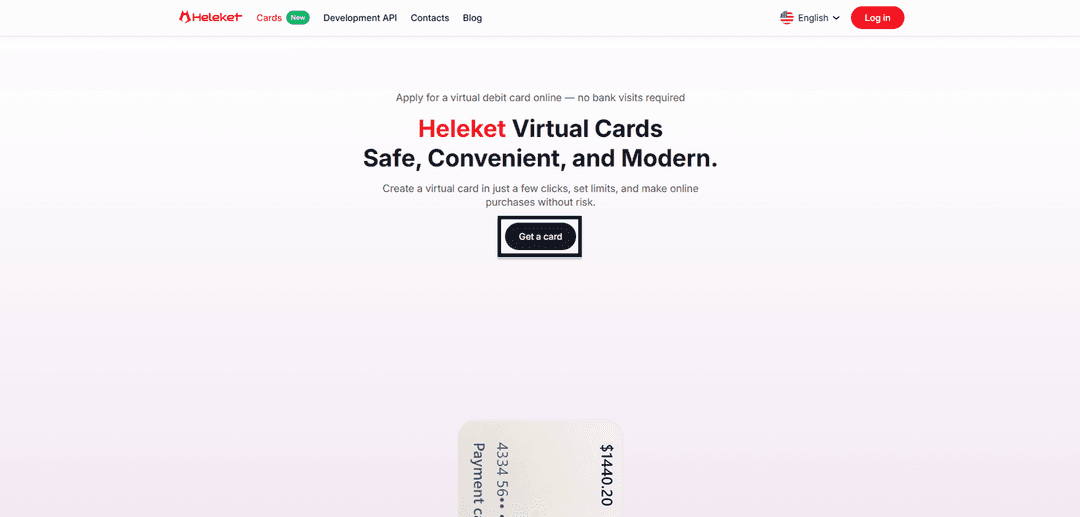
On our website, go to the virtual cards section. On the page, click the "Get Card" button. The system will direct you to the registration or account login form.
Step 2. Register or Log into Your Account
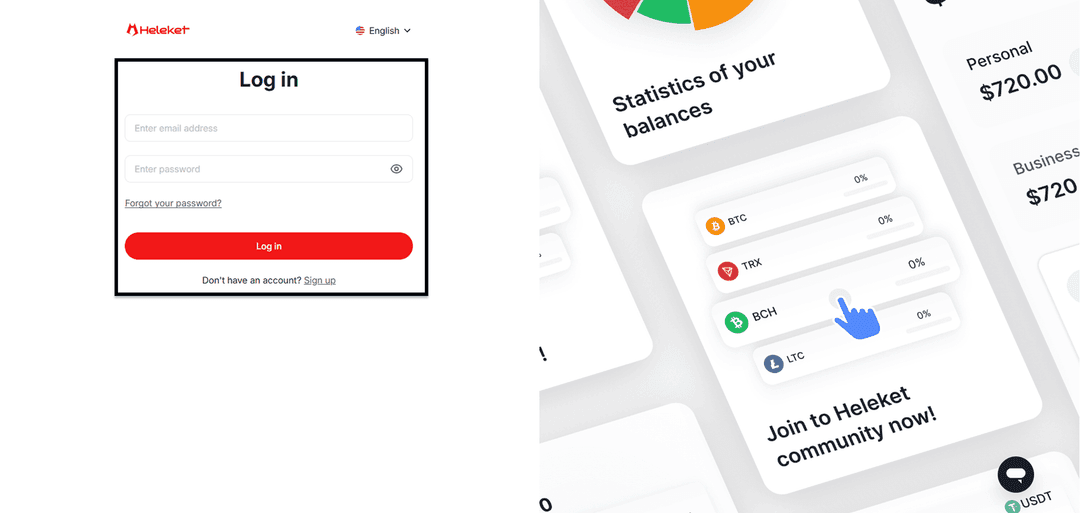
If you're new to Heleket — create an account. Provide your email, create a password, and confirm your email through the link in the letter. No documents or verification at this stage. If you already have an account — log in with your credentials.
Step 3. Top Up Your Wallet with $20
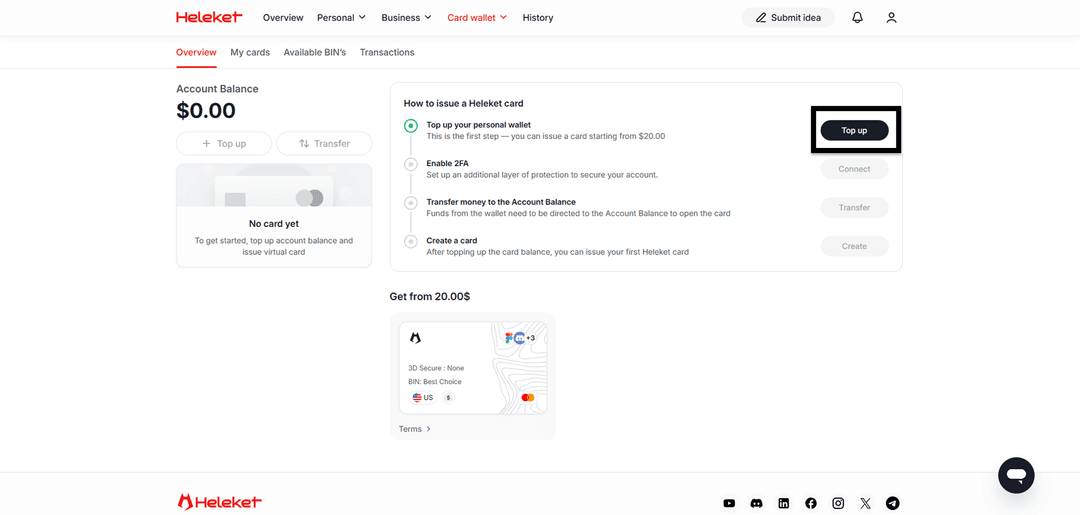
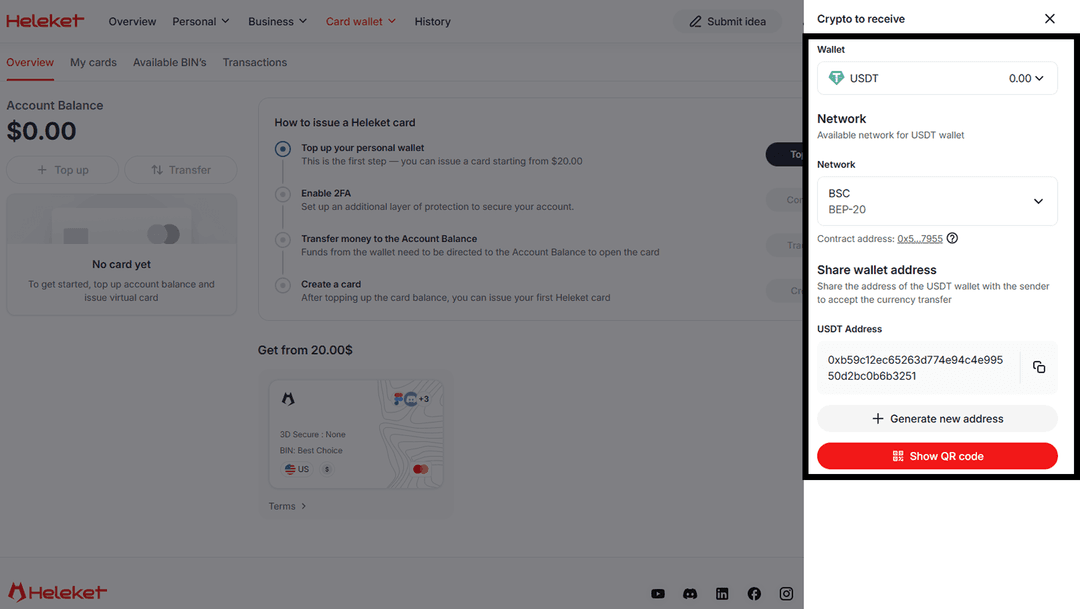
In your personal account, go to the "Cards" section and click the "Top Up" button. Choose the cryptocurrency you want to use for top-up and specify the network for transfer. Heleket will generate a wallet address — send funds from your exchange account or crypto wallet to it. The minimum top-up amount is $20. Of this amount, a one-time payment of $5 will go to card issuance, and $15 will remain on the card balance. Funds will appear in the account after transaction confirmation in the blockchain.
Step 4. Activate 2FA and Issue the Card
Before issuing the card, you need to activate two-factor authentication. Click the "Enable" button next to the 2FA item.
After activating 2FA, click the "Transfer" button to transfer funds from your wallet to the card account. Specify the required amount and confirm the payment. When the money is in the account, click "Create Card." The card will be issued in a few seconds.
Card is Ready
After issuance, the card will appear in your personal account along with the current balance. Here you'll also see all the details — card number, expiration date, and CVV code. You'll need this data to pay on Skillshare. The card is fully ready to use and accepted everywhere foreign cards work.
Paying for Skillshare with a Heleket Card
The card is issued — now let's subscribe to Skillshare.
Step 1. Go to Skillshare and Register
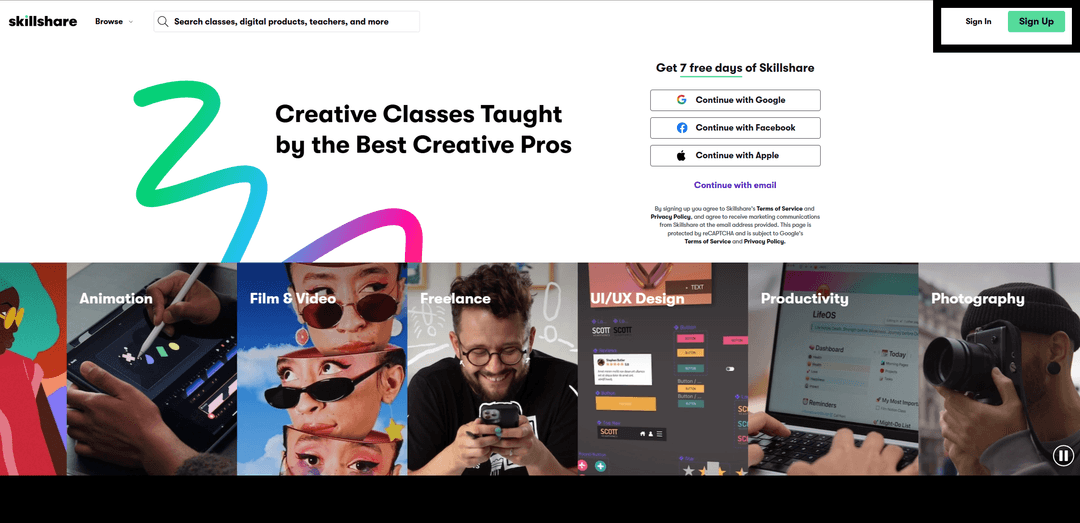
Open the website skillshare.com. If you don't have an account — click "Sign Up" and choose a registration method. Skillshare offers login via email, Google, Facebook, or Apple. Enter your data and confirm your account.
If you already have an account — just log in with your credentials.
Step 2. Enter Card Details
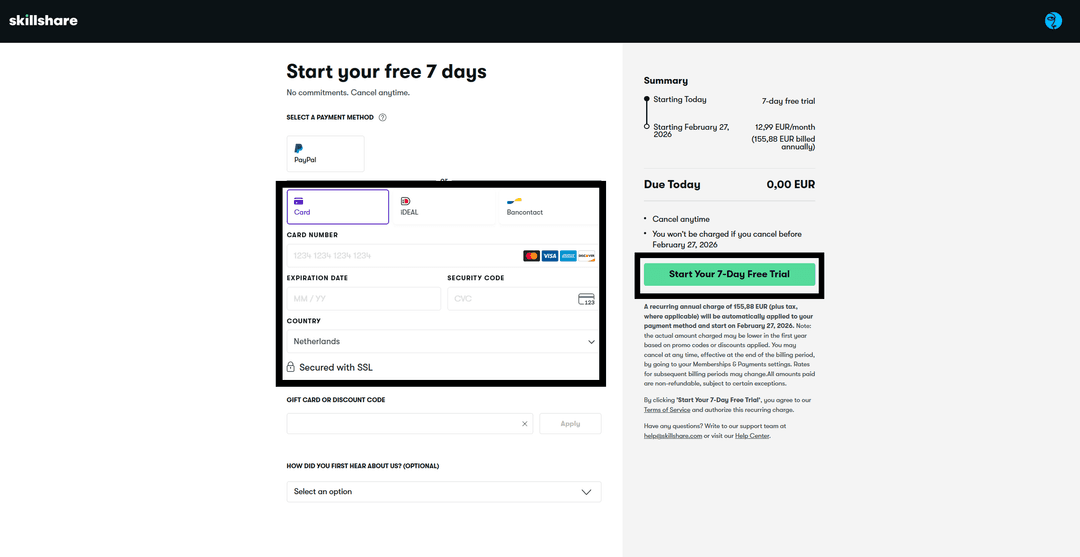
Immediately after registration, Skillshare will offer to subscribe. A form for entering payment details will appear on screen. Enter the Heleket virtual card number, expiration date, and CVV code. In the country field, select USA — this is the country the virtual card is linked to. This is necessary for the payment system verification.
Click the confirmation button. When activating the trial period, Skillshare may charge and immediately refund $1 to verify the card. Make sure there are at least a few dollars on the balance above the subscription cost.
Subscription Management
After successful payment, you'll get full access to all courses on the platform. Here's what's useful to know.
Skillshare automatically renews the subscription every year. The card is saved in the system, and when the renewal date arrives, the platform will try to charge payment. Monitor the Heleket card balance and top it up in advance — at least 3–5 days before the charge date.
If you want to cancel the subscription, go to account settings on Skillshare, find the subscription section, and click "Cancel Membership." Access to courses will remain until the end of the paid period, but automatic renewal will be disabled.
When signing up for the trial period, set a reminder a couple of days before it ends. If you decide not to continue — cancel the subscription in advance, and money won't be charged. If you forget to cancel but there aren't enough funds on the card — the subscription simply won't activate, there are no penalties for this.
You can download courses for offline viewing through the Skillshare mobile app on iOS and Android. This feature is not yet available on computer.
How to Avoid Payment Errors
A few recommendations that will help process the payment on the first try.
Specify the country correctly. There's a country selection field in the Skillshare payment form. Specify the country corresponding to the card BIN — in our case, it's the USA. Mismatch between country and card data is one of the most common reasons for rejection.
Don't repeat failed attempts in a row. If the payment was declined — wait a few hours before the next attempt. Multiple rejections in a row can lead to temporary card blocking on Skillshare's side.
Copy details from your Heleket personal account. Manual entry of a long card number increases the chance of a typo. Copy the number, expiration date, and CVV directly — this eliminates errors.
Check if the browser is blocking the payment form. Extensions like ad blockers can interfere with loading the Skillshare payment window. Try disabling extensions or opening the page in incognito mode.
If the payment doesn't go through after all checks — contact Heleket support. The technical team works around the clock and will help figure out the reason for rejection. You can contact support on Telegram — t.me/heleketsupport.
Conclusion
Skillshare is one of the best platforms for learning creative and professional skills. Payment restrictions from Russia are no reason to give up access to 35,000+ courses. The Heleket virtual card allows you to pay for a subscription in a few minutes, without intermediaries and with a 3.5% commission instead of 15–20%.
The entire path from registration to the first lesson on Skillshare takes just a few minutes. And besides Skillshare, this same card is suitable for paying for dozens of other foreign services — from ChatGPT and Netflix to Amazon and Spotify.
Share
Latest blog posts
The Latest industry news, interviews, technologies and resourses