
Cards
How to Pay for a Claude Pro Subscription from Russia
#service-payments
Anthropic's Claude neural network has become a go-to tool for thousands of professionals — from copywriters to developers and analysts. The problem is that paying for Claude with a Russian bank card is impossible. Transactions are blocked before they ever reach the service. Below, we break down what prevents payment and how to solve the issue using a Heleket virtual card.
What Claude Pro Is
Claude is a product of Anthropic. It's an AI assistant capable of generating text, analyzing code, processing uploaded files, and carrying out multi-step conversations. One of Claude's standout strengths is its context window size. The model retains up to 200,000 tokens at a time, making it possible to load large documents into the chat and receive responses that account for the entire content.
The free tier gives access to the Claude Sonnet model. The daily limit is roughly 20–30 requests — enough to test the service, but for serious daily use, the ceiling arrives quickly.
The Pro plan removes that restriction. It costs $20/month on a monthly billing cycle, or $17/month when paid annually. Subscribers get access to the full Claude model lineup, five times the limits compared to the free plan, and a set of advanced features: extended thinking, context persistence across sessions, chat organization into projects, email and calendar integrations, the Claude Code tool for working with code via terminal, and priority request processing during high server load.
Why Russian Bank Cards Don't Work with Claude Pro
After Russian banks were disconnected from the international Visa and Mastercard payment networks, all cross-border transactions from Russian cards became impossible. The block doesn't happen on Claude's end — it's built into the payment infrastructure itself.
You fill out the payment form on Claude's website, click confirm, and a few seconds later you get a declined notice. It doesn't matter which bank issued the card or which payment network it uses. Mir cards simply aren't accepted by foreign services.
Alternative payment channels are blocked too. PayPal only links to cards from foreign banks — a Russian account is useless for international purchases. Google Play has stopped accepting payments from Russian cards. The App Store technically works, but requires a pre-funded Apple ID balance in a foreign currency, which in turn requires a gift card from the matching region.
The same barriers apply when trying to pay for a Claude AI Team subscription from Russia — the corporate plan goes through the same payment gateway, and Russian cards are blocked just the same.
Existing Payment Methods
Despite these restrictions, users in Russia have found working workarounds. Each comes with its own pros and cons.
Payment intermediaries. The scheme is simple — you send rubles, and the intermediary processes the payment with their foreign card. Speed: 15 minutes to an hour. The main downside is a 15–25% markup. On a $20 Claude Pro subscription, that's an extra $3–5 every month. Some intermediaries also ask for your Claude login and password, which puts your account security at risk.
A foreign bank card. If you have an account at a bank in Kazakhstan, Armenia, Turkey, or another country, a card from there will work on Claude without issue. However, opening such an account requires an in-person visit, a set of documents, and often a minimum deposit. A reliable option, but labor-intensive to set up.
A friend with a foreign card. Zero fee, instant payment. But asking someone to pay for you on a recurring basis isn't the most convenient solution, especially for monthly renewals.
App Store gift cards. Works for iPhone users. You buy a gift card for the right region, add the funds to your Apple ID, then subscribe through the Claude mobile app. The catch: these cards aren't always easy to find at a fair price, and your Apple ID region must match the gift card's region.
A virtual card funded with crypto. You issue a Visa card yourself, top it up with crypto, and pay Claude directly. No one gets access to your account. The fee is minimal — just the top-up commission. Heleket stands out among similar services with a low 3.5% fee and instant card issuance.
How a Heleket Virtual Card Can Help
Heleket is our crypto internet acquiring service. One of its features is virtual card issuance — cards accepted at any online store or platform that supports the payment network. Claude is one of them.
Here's how it works. Cryptocurrency arrives in your Heleket wallet, gets converted into dollars, and is credited to your virtual card balance. You then enter that card's details (number, expiry, CVV) into the payment form on Claude's website — the process is no different from paying with a regular debit card. The charge goes through instantly, and if a transaction doesn't go through for any reason, the funds are returned to the card balance.
Let's break down the terms in detail.
Top-up fee is 3.5% of the amount. For example — topping up $25 (more than enough for a month of Claude Pro) costs $0.88 in fees. With an intermediary, the same operation would cost $3–5.
Minimum starting deposit is $20. That's how much you need to deposit into your Heleket wallet before issuing a card. After the $5 issuance fee is deducted, $15 remains ready to use.
17 cryptocurrencies are supported. These include USDT, BTC, ETH, and other popular coins. The full list is published on our website.
Built-in 3D-Secure. Anthropic requires 3DS payment verification — Heleket cards pass this check without any issues.
No verification required. An account is created with just an email — no passport scans or selfies needed. Full terms of service are available in your personal account after registration.
Beyond Claude, the same card can be used to pay for ChatGPT, Midjourney, Spotify, Netflix, Amazon, and other platforms that accept foreign cards.
How to Get a Heleket Virtual Card
The entire card issuance process happens online and requires nothing more than an email address and cryptocurrency. Here's a step-by-step guide.
Step 1. Open the Virtual Cards Section
Go to the section dedicated to virtual cards. Click the "Get a Card" button.
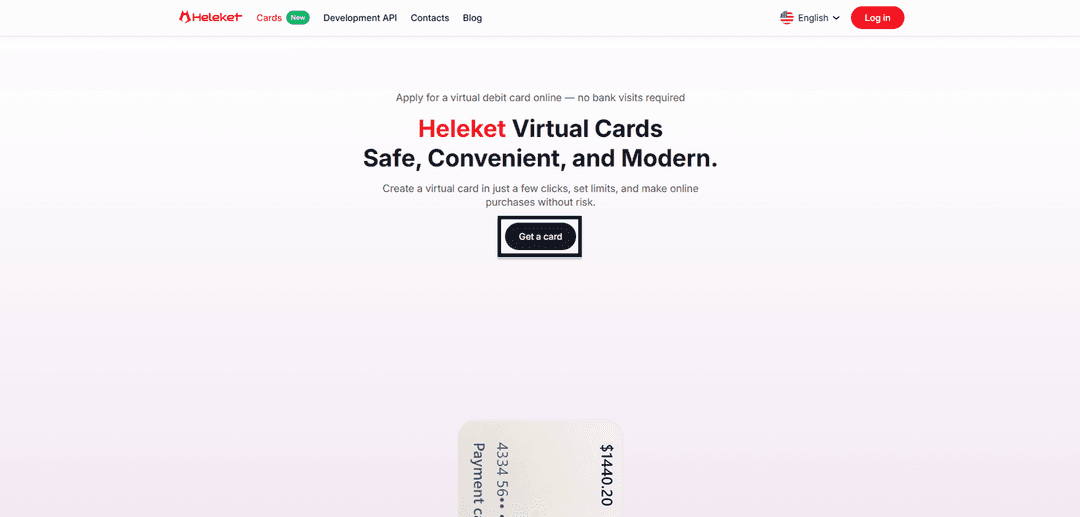
You'll land on the registration or login screen.
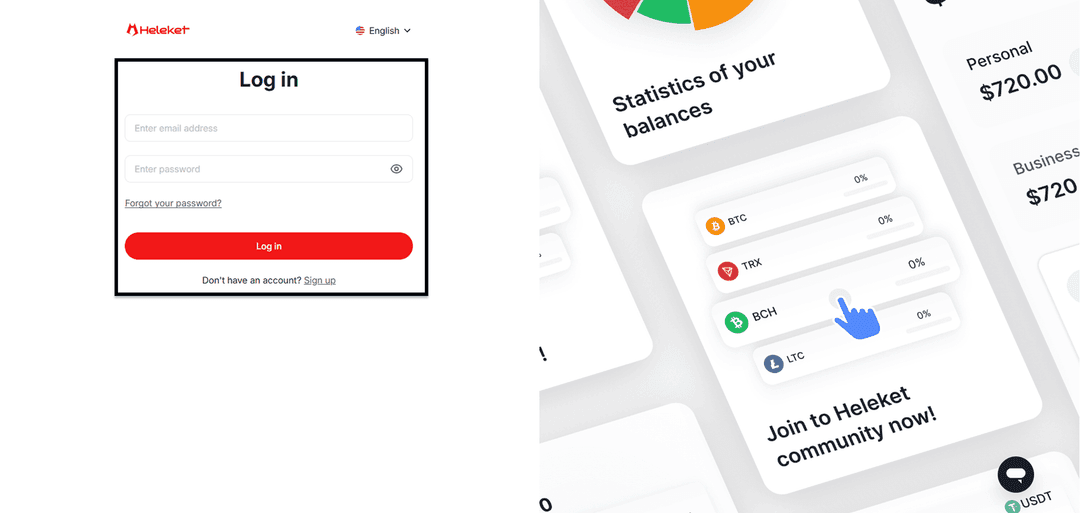
Step 2. Create an Account or Log In
If you're new to the platform, complete the quick registration. You'll need a working email (a confirmation link will be sent to it) and a password. If you've used Heleket before, sign in with your existing credentials.
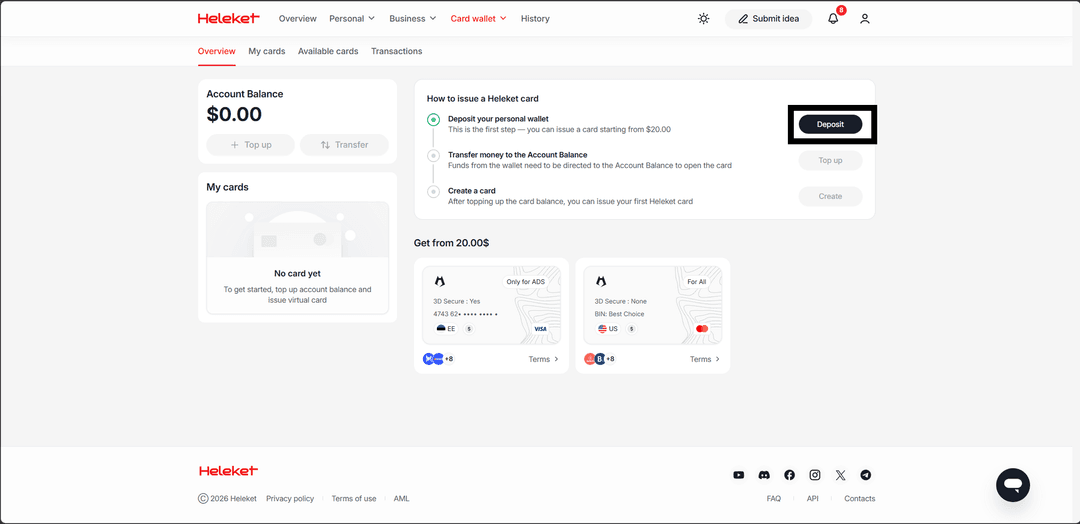
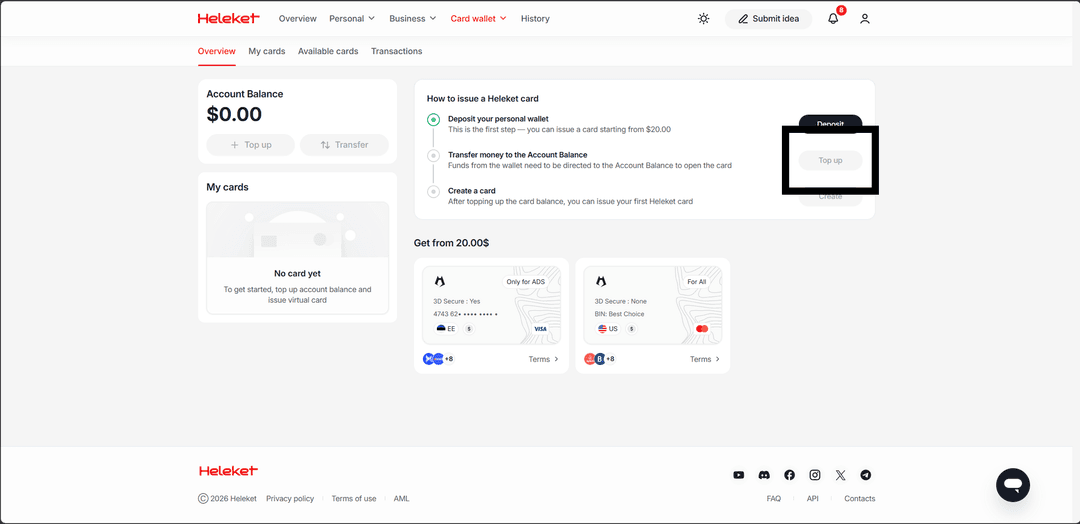
Step 3. Top Up Your Wallet with $20
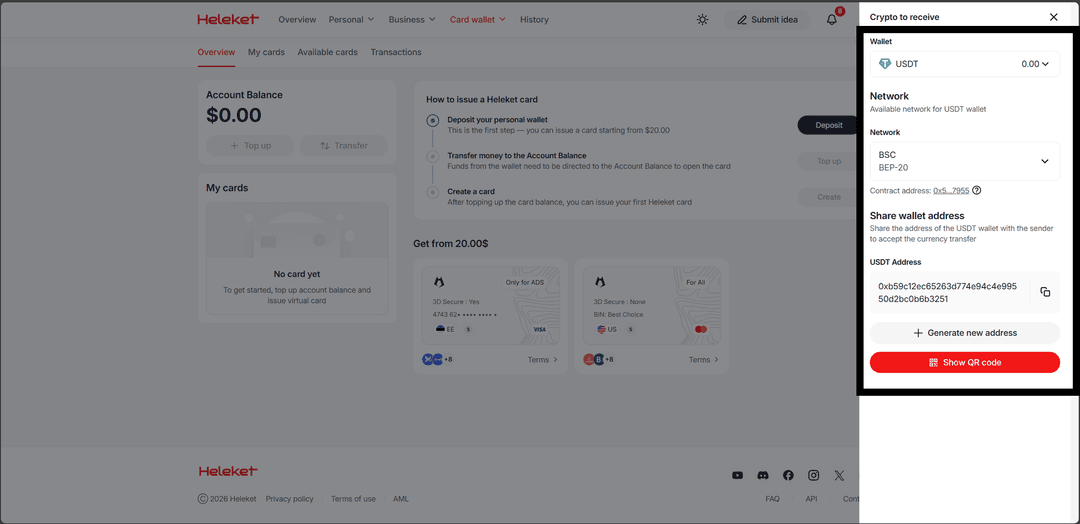
Inside your personal account, find the "Deposit" button. You'll be presented with a list of cryptocurrencies and networks — for example, USDT via TRC-20 (one of the cheapest networks in terms of transfer fees) or others of your choice. Heleket will generate a unique address — transfer crypto to it from an exchange account or external wallet. The funds will be credited after blockchain confirmation. From the deposited amount, $5 will be deducted as a one-time card issuance fee, and the remaining $15 will go to the card account.
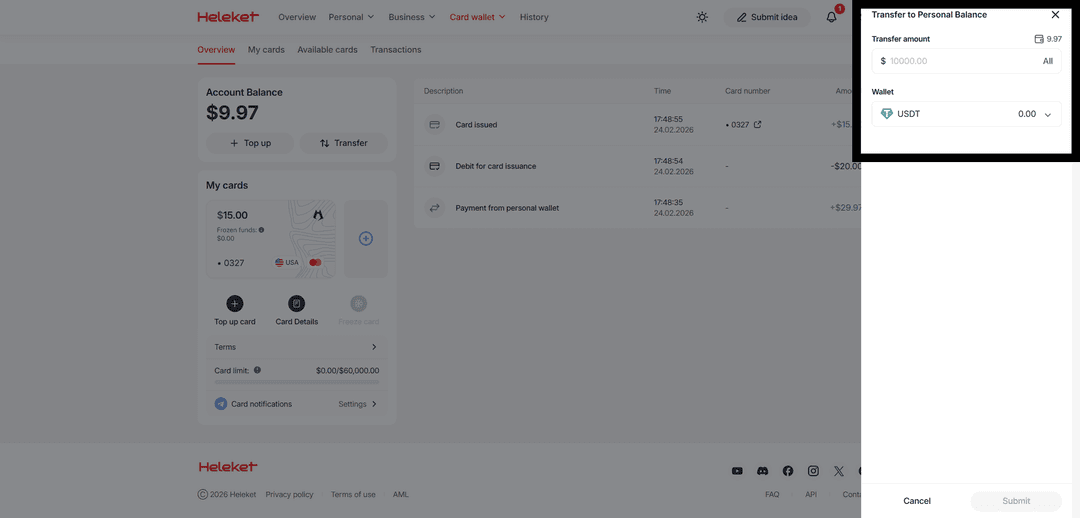
Step 4. Transfer Funds to the Card Account
After topping up, click the "Fund Card" button. This moves the funds from your crypto wallet inside Heleket to the card account that payments will be charged from. Enter the transfer amount and confirm the operation. Funds appear on the card account instantly.
Transfer twenty dollars in the currency of your choice.
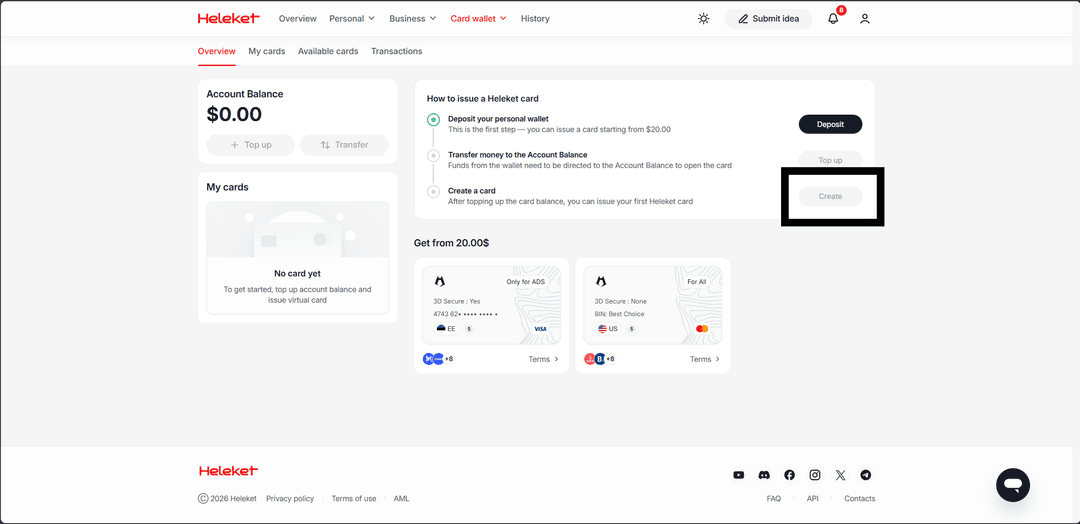
Step 5. Issue the Card
Click the "Create" button.
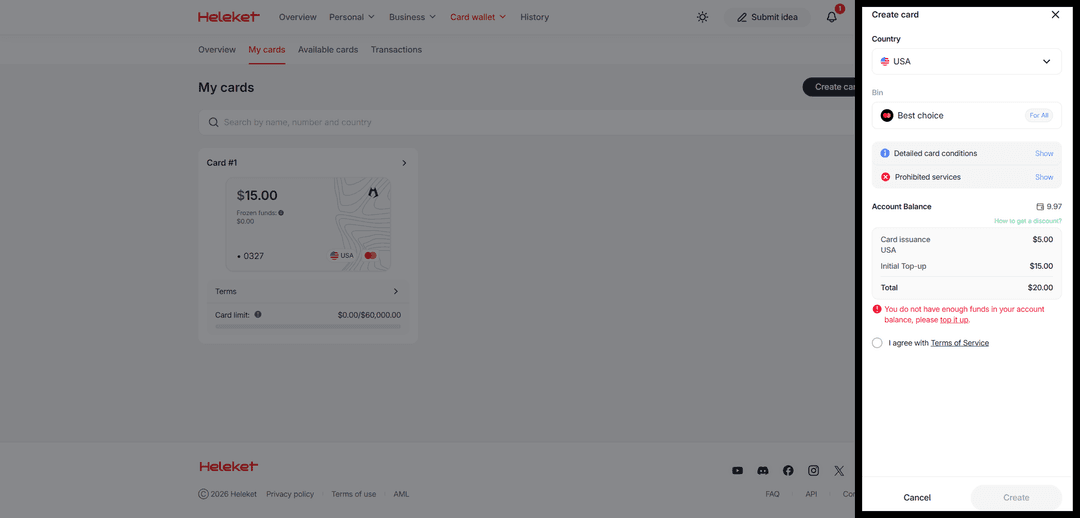
Select a BIN — for paying Claude, choose the United States. Confirm that you agree to the terms of use and click "Create." The card will be generated within seconds. You'll see the card number, expiry date, and CVV code.
The Card Is Ready to Use
The issued card appears in your personal account along with your current balance. You can always view the card details, check the remaining balance, and top it up when needed. The card works immediately after issuance — no additional activation steps are required. You're ready to pay for Claude Pro.
How to Pay for Claude Pro
Your Heleket card is issued and funded — now let's walk through how to subscribe to Claude. The entire process happens on Claude's website and takes just a few minutes. Here's a detailed guide covering every step.
Step 1. Go to the Claude Website and Sign In
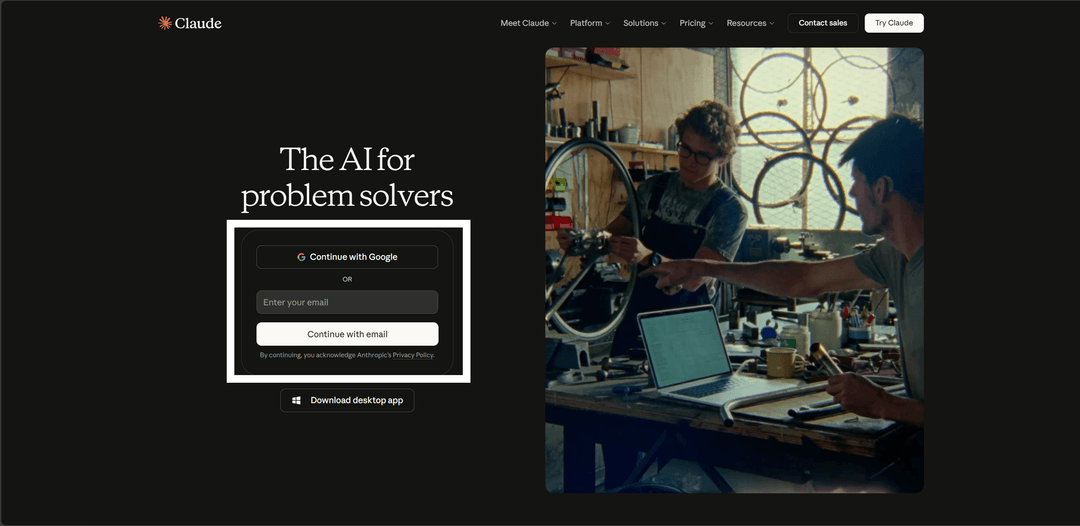
Open Claude in your browser. If you already have an account, click "Enter your email" and enter your email and password. You can also sign in with a Google account. If you don't have an account yet, you'll need to register — provide an email address, confirm it, and set a password. Registration gives you access to Claude's free plan.
Step 2. Click Upgrade on the Main Page
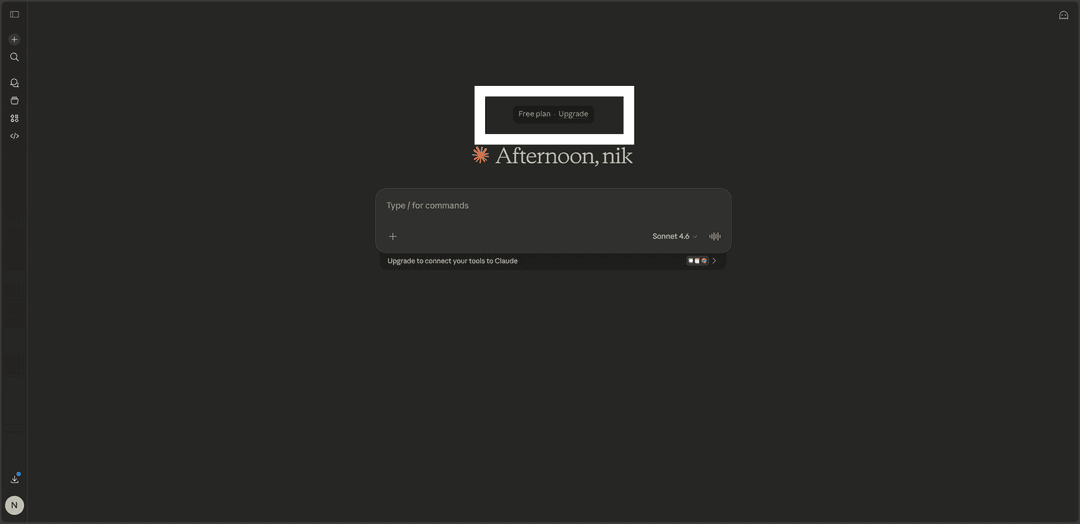
After signing in, you'll land on Claude's main chat page. Find the "Upgrade" button — it's located just above the welcome screen and leads to the plan selection page. Click it to proceed to subscription setup.
Step 3. Choose a Plan
Claude will offer several subscription options. Here's what they include.
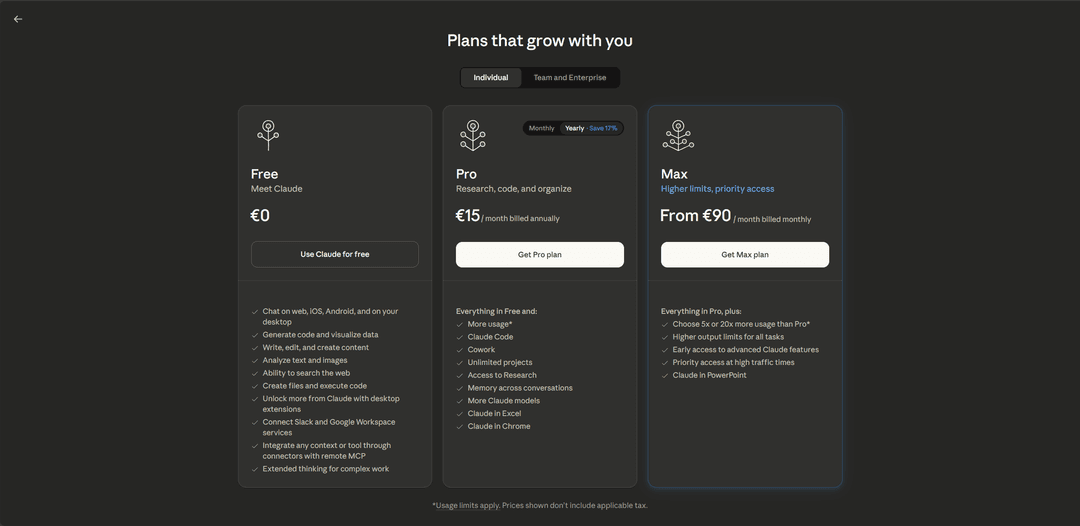
Pro — $20/month (or $17 with annual billing). Message limits approximately five times higher than the free plan. Access to all Claude models, including flagship ones. Extended thinking mode, Projects, Claude Code, integrations, memory between sessions, and priority access. For most users, Pro is the optimal choice.
Max — two tiers. At $100/month, you get limits five times higher than Pro. At $200/month — twenty times higher than Pro. Max is for those who work with Claude all day — copywriters handling large volumes, developers, analysts.
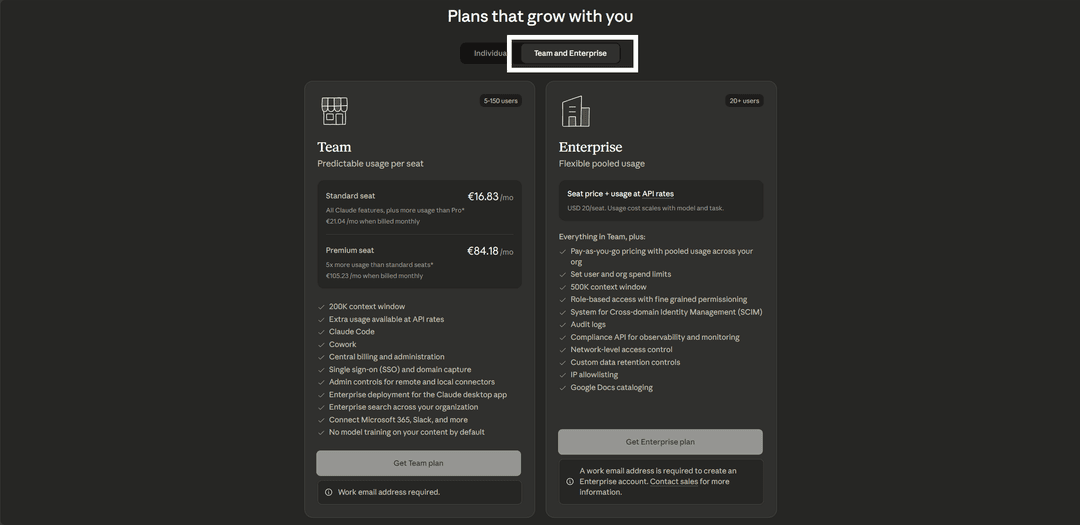
Team — starting at $25 per user per month, minimum five users. Includes all Pro features plus collaboration tools, member management, unified billing, and enterprise security features.
Enterprise — custom pricing for large organizations. Anthropic doesn't publish a fixed rate — it's calculated per company based on the number of users and requirements. Enterprise includes all Team features plus advanced security capabilities, a dedicated manager, an expanded context window, priority technical support, and flexible payment terms. This plan is designed for companies with dozens or hundreds of employees who need full Claude integration into their workflows. Getting started requires contacting Anthropic's sales team.
Choose the plan that fits your needs. For getting started, Pro is recommended — it covers the needs of the vast majority of users.
Step 4. Choose a Billing Cycle
Claude will offer two payment options — monthly or annually. The annual subscription works out cheaper per month and saves roughly 17% off the base price. If you're confident you'll use Claude regularly, the annual plan is the better deal. If you'd prefer to try it first, go with monthly billing — it can be cancelled at any time.
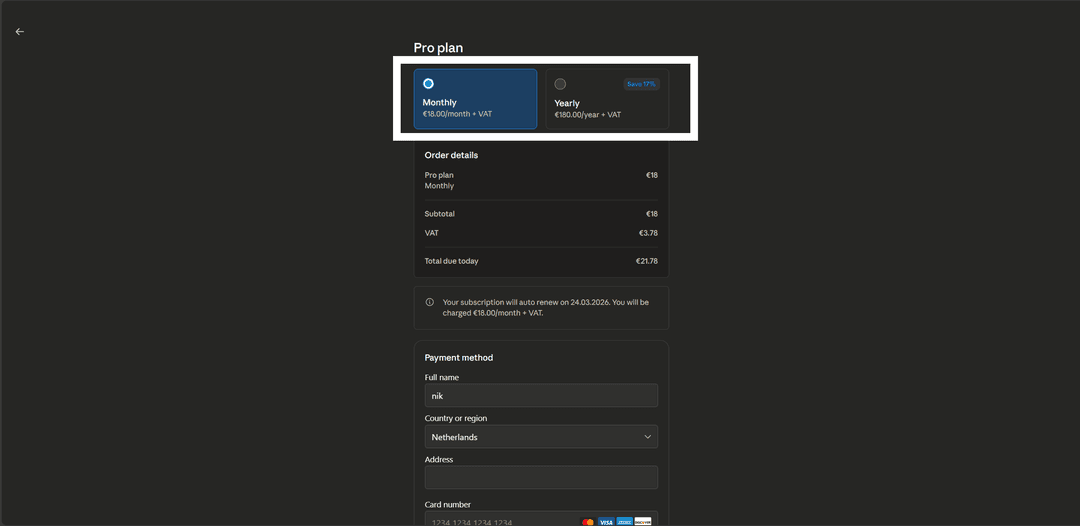
Step 5. Fill In Your Payment Details
A form will open for entering your card details. Fill in the following fields.
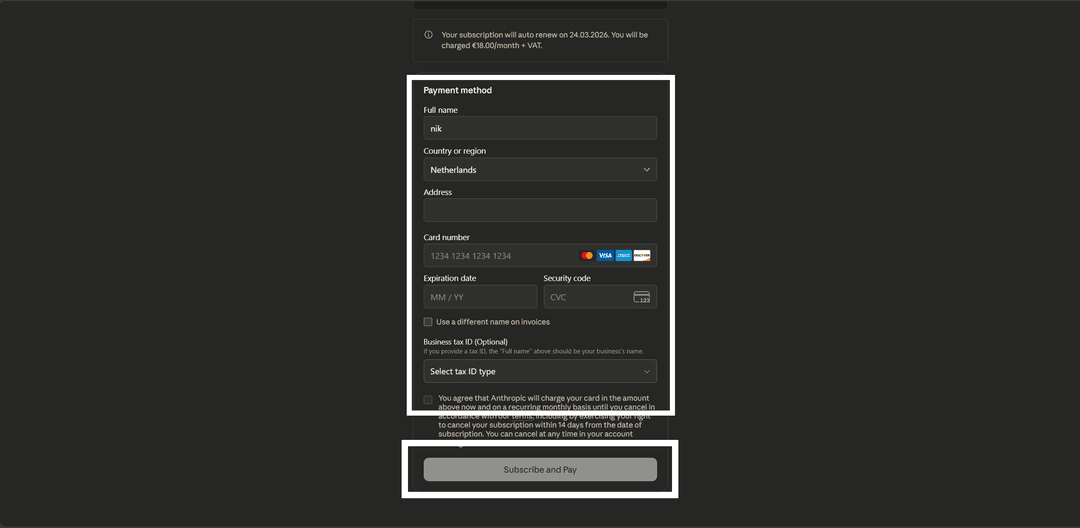
Full name — enter a name in Latin characters. Any name works, it just needs to match the format (Latin letters only).
Country or Region — select a country from the dropdown. Choose the United States, as it matches the BIN of your Heleket card. Do not select Russia — the card is a foreign card.
Card number — enter the 16-digit number of your Heleket virtual card. It's recommended to copy it from your personal account after creating the card to avoid typos.
Expiration date — the card's expiry date in month/year format. This information is also available in your personal account.
Security code — the three-digit CVV code (in our case, it's displayed in your personal account after card creation).
Business Tax ID (optional) — an optional field for entering a company tax ID. If you're paying as an individual, skip it.
Check the box confirming your agreement to the service's terms of use, then click the payment confirmation button.
What to Know After Subscribing
Once the payment is successfully processed, the subscription activates instantly. Your Claude account settings will show your current plan and the next billing date.
Claude automatically renews the subscription each month (or each year for annual plans). Top up your Heleket card in advance — 3–5 days before the billing date. If the card doesn't have sufficient funds, the subscription won't renew and you'll revert to the free plan. All your progress, projects, and chat history are preserved.
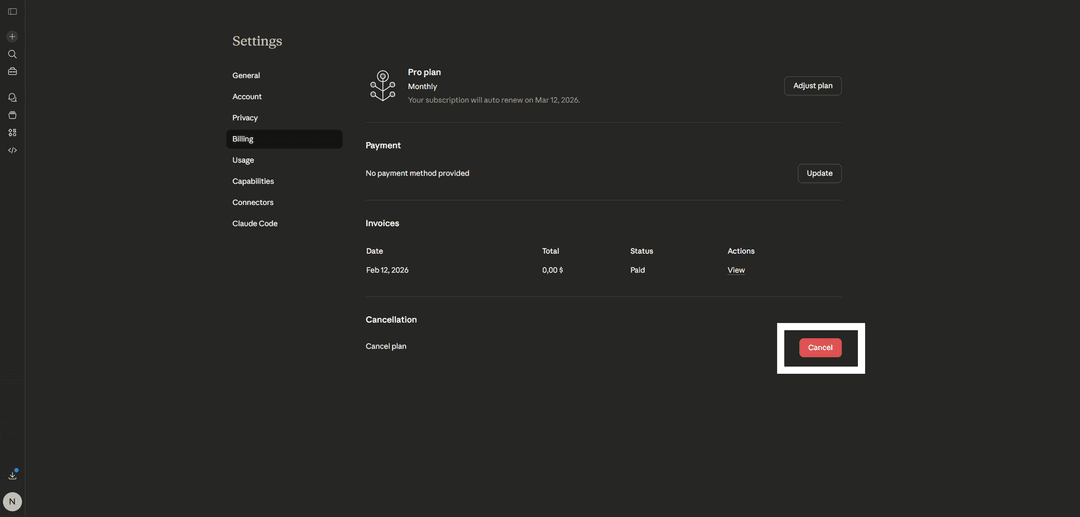
To cancel your subscription, go to your Claude account settings.
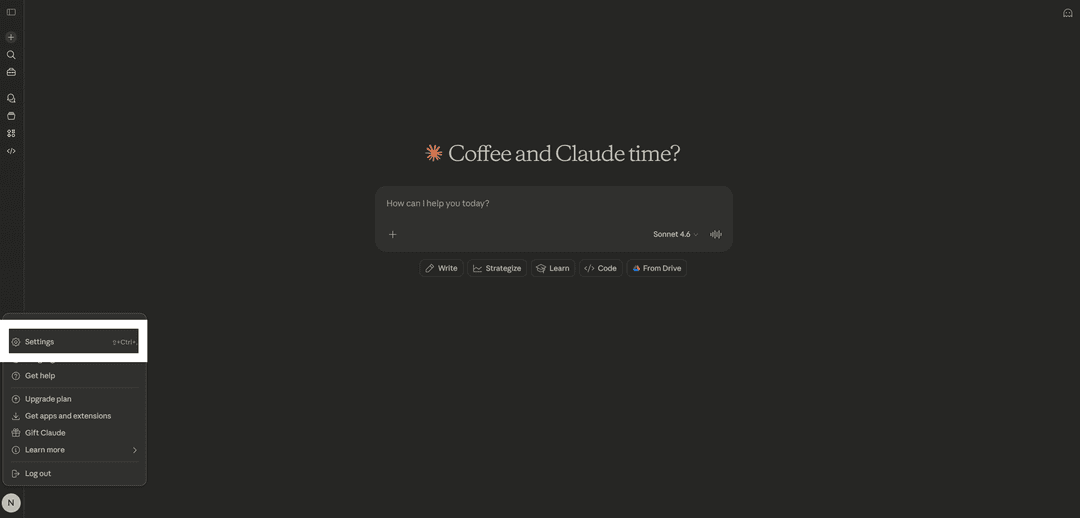
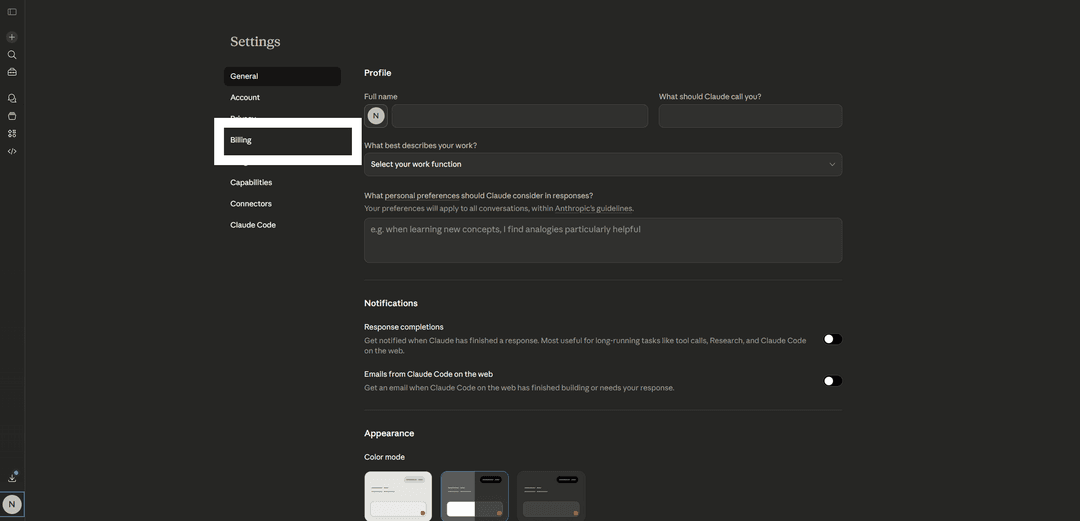
Click "Cancel." Access to the subscription will remain active until the end of the paid period.
The subscription is tied to your account, not your device. You can use Claude Pro on a computer, phone, and tablet simultaneously — just sign in with the same account.
Conclusion
Claude Pro transforms the AI assistant from something you "try once" into a full-fledged work tool — with expanded limits, advanced models, and a suite of professional features. Payment restrictions for Russian cards are resolved in minutes with a Heleket virtual card. One-time issuance — $5, top-up fee — 3.5%, with support for all major cryptocurrencies.
From creating a Heleket account to having Claude Pro activated and ready to go takes less than an hour. You control the entire process yourself — no handing over personal data to intermediaries, and no 15–25% markups.