
Accept Cryptocurrency Payments on Tilda Websites
#guides
Cryptocurrencies are changing the ways of monetizing online businesses. According to Triple-A data, in 2024, the number of active digital currency users reached 562 million people. Website owners are missing out on 12-18% of potential profits by not offering cryptocurrency payment options for goods and services.
Tilda CMS remains the leader among website builders — a platform for creating landing pages, online stores, and corporate portals without programming. You manage content through a visual editor: add templates and blocks for Tilda, configure payment forms, and connect payment systems with just a few clicks.
In this article, we'll explore cryptocurrency payment integration through a specialized widget — from installation and Tilda configuration to optimization of all operational parameters.
How to Accept Crypto Payments Through Tilda CMS: Step-by-Step Guide
Before we begin, register or log in to Heleket and create a merchant.
Step 1: Register
Go to the Tilda website and click the "Register" button to create a new account.
Provide all necessary information to complete the registration process, including your name, email address, and password.
Step 2. Access Dashboard and Payment System
Log in to your Tilda account using the credentials you just created.
Step 3. Navigate to Custom Payment Gateway
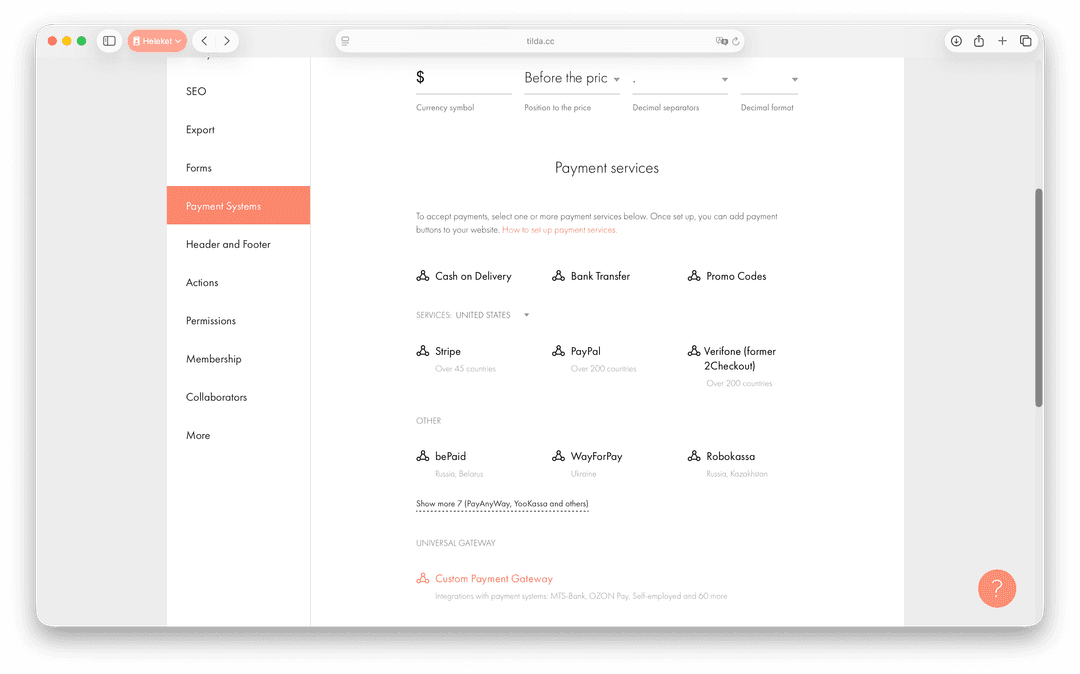
Scroll down to the end of the payment systems list and select "Custom payment gateway". In the opened window, in the "Choose template" dropdown list, select "New payment system (for developers)".
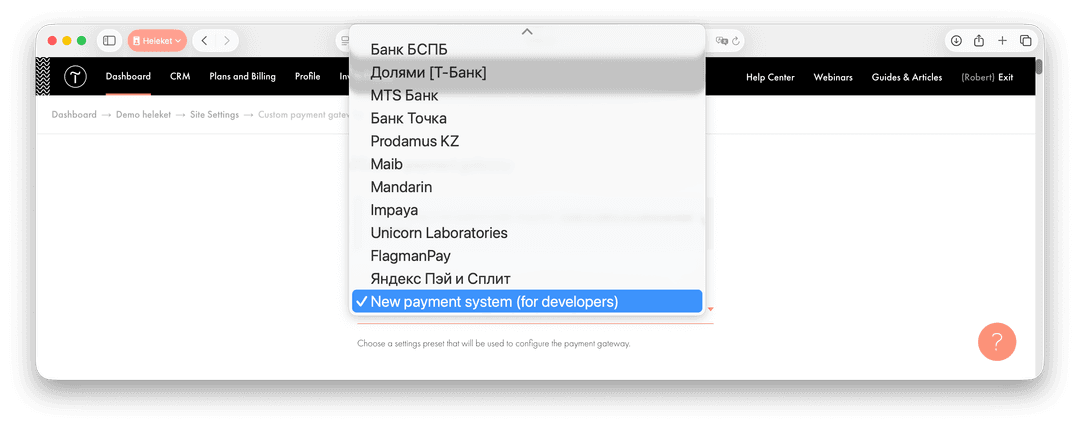
Step 4. Fill in Basic Settings
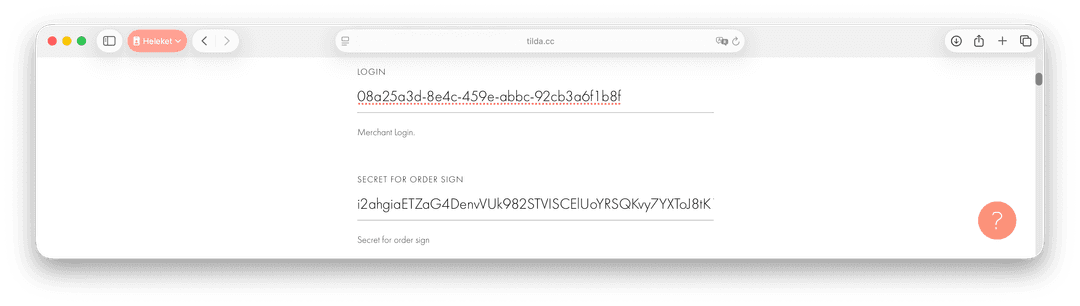
Fill in the following data: "LOGIN" and "SECRET FOR ORDER SIGN".
| Field Name | Data | |
|---|---|---|
| LOGIN | DataMerchant Uuid | |
| SECRET FOR ORDER SIGN | DataPayment key |
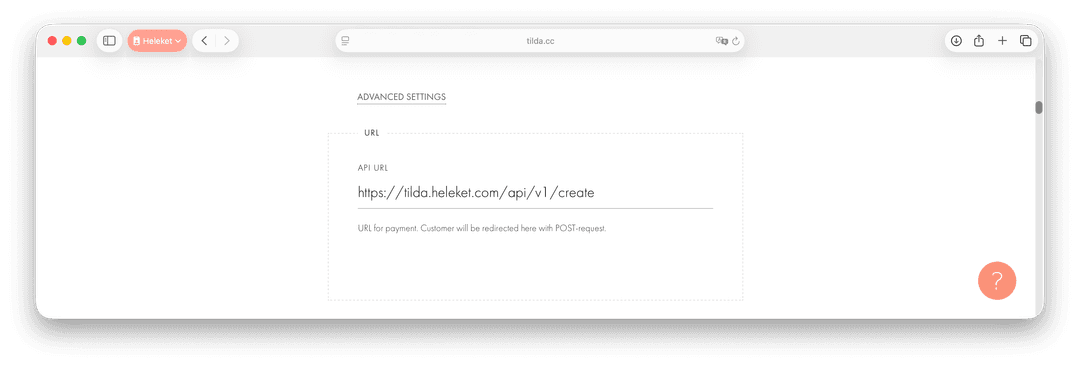
Then add the API URL.
| Field Name | Data |
|---|
Click ADVANCED SETTINGS and fill in the following fields in MAPPING FIELD LIST:
| Field Name | Data | Additionally | |
|---|---|---|---|
| Login | Datamerchant | ||
| Currency | Datacurrency | AdditionallyEUR/USD | |
| Language | Datalang | AdditionallyUppercase | |
| Country | Datacountry | AdditionallyUppercase | |
| Notification URL | Dataurl_callback | ||
| Order number | Dataorder_id | Additionally<project_id> _ <order_id> | |
| Order description | Datadescription | ||
| Amount | Dataamount | Additionallyin USD/EUR | |
| Customer email | Dataemail | ||
| Customer phone | Dataphone | ||
| Customer name | Dataname | ||
| Signature | Datasign | ||
| Products | Dataitems | ||
| Success URL | Dataurl_return |
The Success URL field is not displayed immediately. For it to appear, you need to first fill in the other settings, save the payment method, and then reopen it for editing. After that, the Success URL field will become available.
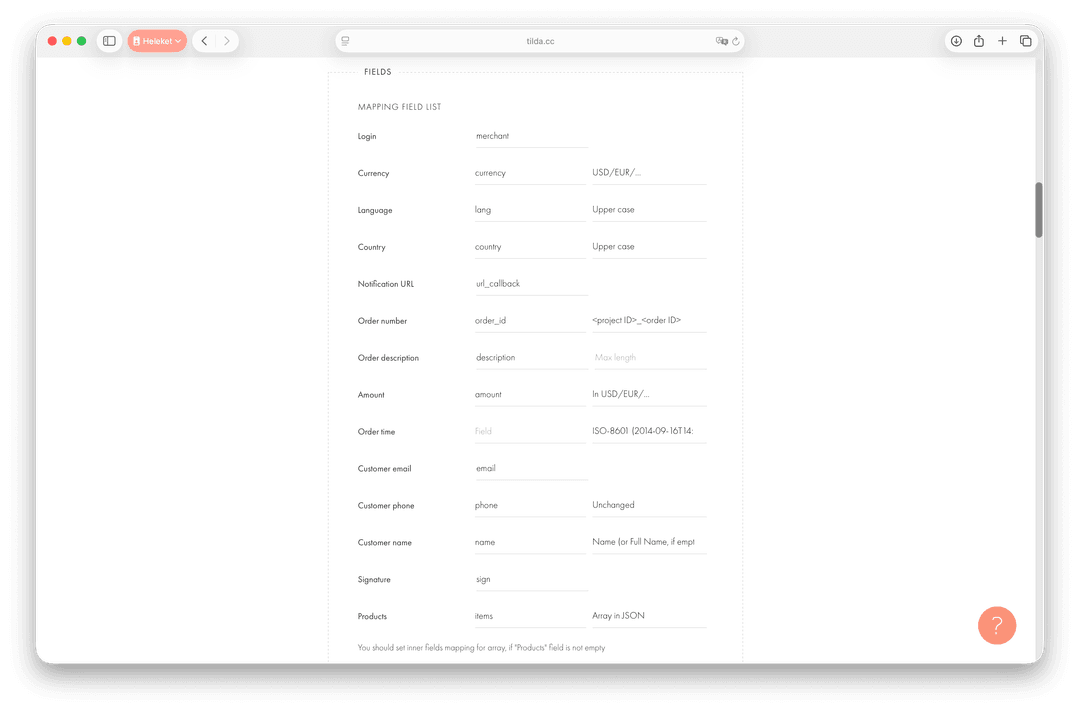
Be sure to pay attention to the Additionally column.
Step 5. Configure ORDER SIGNATURE
The next step is to configure ORDER SIGNATURE.
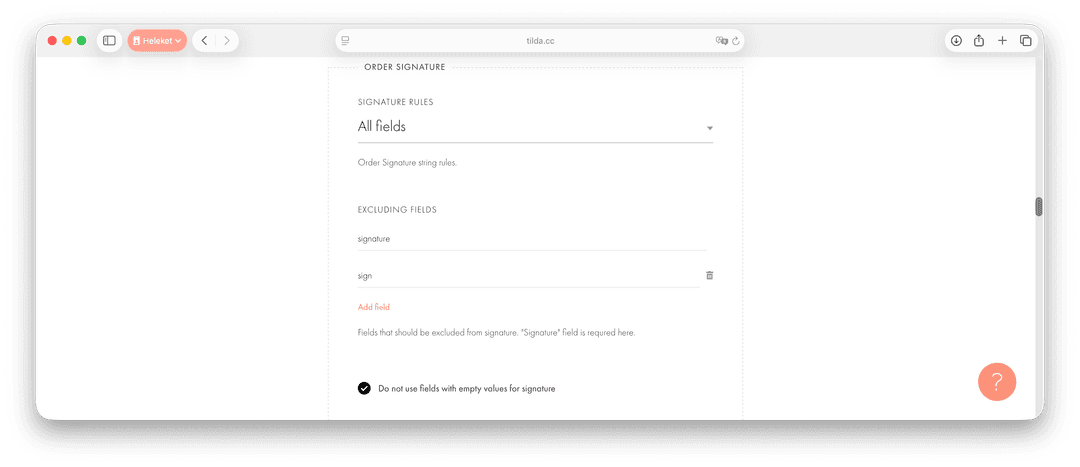
- In the SIGNATURE RULES section, select All fields.
- In the EXCLUDING FIELDS section, enter signature, then click add field and enter sign.
- Activate the option Do not use fields with empty values for signature.
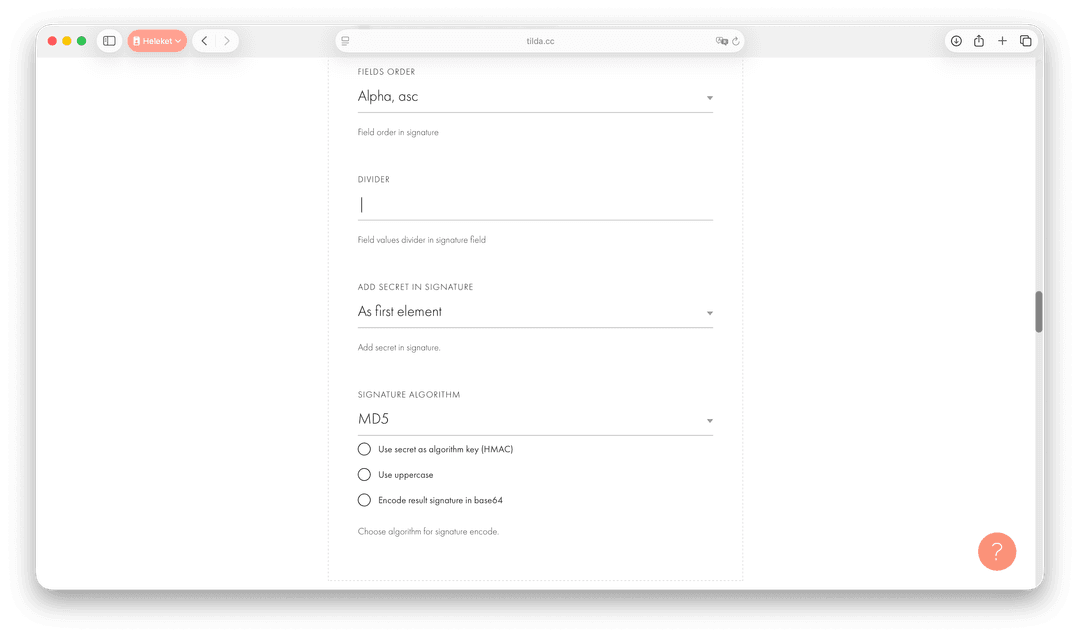
- In the FIELDS ORDER section, select Alpha, asc.
- In the DIVIDER field, add the following separator: |.
- In the ADD SECRET IN SIGNATURE field, select the As first element option.
- In the SIGNATURE ALGORITHM field, select MD5.
Step 6. Configure NOTIFICATION
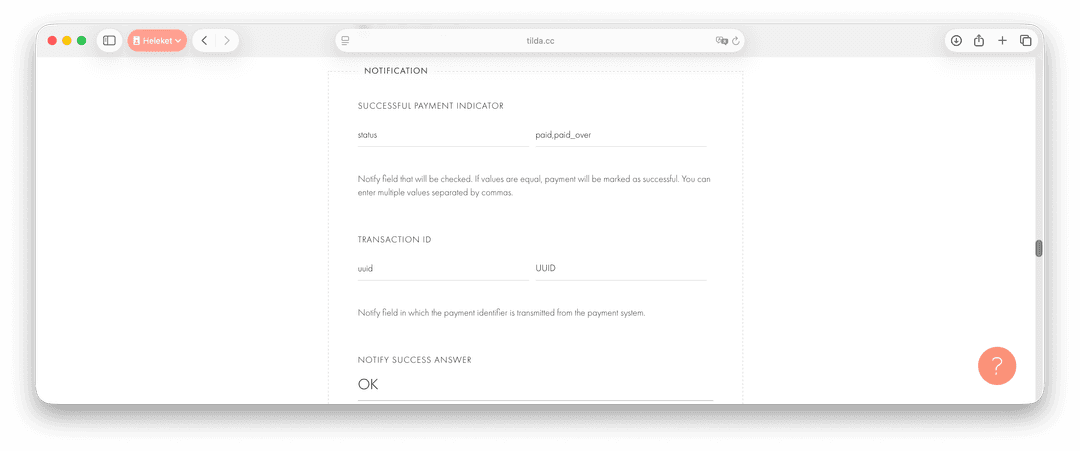
Configure NOTIFICATION to receive payment status updates.
- In the SUCCESSFUL PAYMENT INDICATOR field, enter status and paid,paid_over.
- In the TRANSACTION ID section, enter uuid and UUID.
- In the NOTIFY SUCCESS ANSWER field, enter OK. This is the value Tilda should return to the payment system in case of successful notification receipt.
Step 7. Enable "Success URL"
At the top of the settings, activate the option to show the "Success URL" field in the payment form. This step is necessary for successful user redirection after payment.
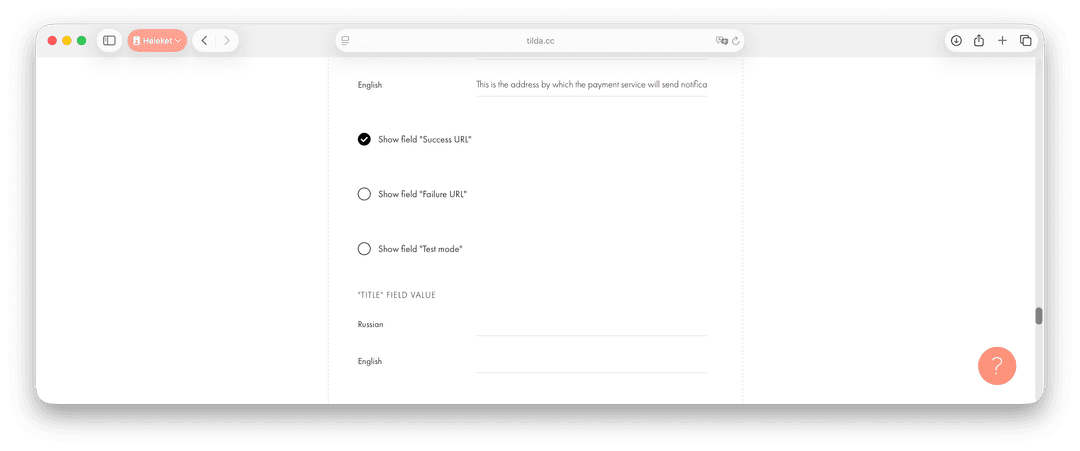
In this section, you can also fill in the following fields:
- TITLE FIELD VALUE: Specify the payment system name.
- SUPPORT EMAIL: Specify the support contact email.
Step 8: Save and Test
After completing all actions and filling in the necessary information, save the settings. Check the custom payment gateway to make sure it's working properly.
Congratulations! You have officially activated cryptocurrency payment acceptance in Tilda using Heleket and can now start receiving payments. Enjoy the convenience and benefits of transaction processing thanks to this integration.
Why Tilda Sites Need Cryptocurrency Payments
Specific benefits for business owners:
Commission savings amount to up to 4% per transaction. PayPal charges 2.9% + $0.30 per operation, YooKassa — 2.8% + 15₽. Cryptocurrency payments cost 0.1-0.8% without fixed surcharges. With a monthly turnover of $10,000, savings reach $290.
Instant fund crediting speeds up order processing. A bank transfer from Europe to Russia is processed in 2-5 business days. A Bitcoin transaction is confirmed in 15-45 minutes, Litecoin — in 5-15 minutes. The buyer receives the goods immediately after payment.
Global reach without geographical restrictions. Traditional payment systems block transfers from 15+ countries or require complex verification. Cryptocurrencies work anywhere there's internet — without exceptions.
Protection from chargebacks saves up to $5,000 annually. In 2023, online stores lost $11.5 billion due to chargeback fraud. Cryptocurrency transactions are irreversible — money is guaranteed to remain in your account.
Options for Accepting Cryptocurrencies in Tilda CMS
The builder offers two approaches to processing digital payments. The first requires manual control of each transaction, the second fully automates Tilda integration with CRM and payment systems through specialized widgets.
1. Manual Payment Control
This method is suitable for Tilda landing pages and business card sites with up to 50 transactions per month. You place a QR code of your crypto wallet in the T123 block (Text), the buyer transfers funds independently. After that, you manually reconcile receipts and send goods.
Limitations of the manual method:
- With 200+ payments per month, verification takes 4-5 hours weekly
- The risk of errors when matching transactions with orders is 8-12%
- Buyers wait for confirmation for up to 6 hours during business hours
- There's no automation of refunds when orders are canceled
2. Automation Through Payment System
Business scaling requires complete automation of financial operations. Specialized payment systems process crypto payments like regular card transactions — without administrator involvement.
Advantages of the automated solution:
- Payments are accepted 24/7 without staff control
- Orders are confirmed through 2-6 blockchain confirmations
- Complete transaction reporting in the system
- Support for 15+ popular cryptocurrencies in a single interface
In Case of Issues
If you encounter problems with crypto payment processing, contact Heleket support service.


